Sunday, 2 February 2014

Root Uninstaller Pro


Description

Don't like stock or system applications? It's for you. This application can freeze pre-installed applications on your phone and more.
*** If your phone does not root, recommend to use my "App Tyrant" app ***
Very fast and simple uninstaller tool on single click for uninstalling both SYSTEM and REGULAR applications.
For ROOT+NAND unlocked devices
☆ Uninstall system applications
☆ Freeze or disable bloatware, stock and regular applications (keep updates)
☆ Defrost or enable applications (Free trial or PRO)
☆ Backup system application .apk to sdcard (that can reinstall later)
☆ Restore backed up applications
☆ Reset applications to fresh install state
☆ Delete definitively system applications
☆ Hide my App: launch a frozen app and automatically re-freeze on app closing (Pro only, tap on Launch->Freeze button )
☆ Explore application data folder, code folder (ex. edit preferences, need AntTek File Explorer)
For NON-ROOT devices
☆ Quick APK list to show all available .APK files on SDCard
☆ Keep Market reference and can restore after factory reset/change devices
☆ Manage to clear data, cache (manually)
☆ Manage .apk files: delete, install, install as a system app (PRO)
☆ Single click to uninstall a listed applications (Batch uninstall).
☆ Rapid load application list
☆ Display application name, icon, package name
☆ Exclude system applications (that you can not uninstall)
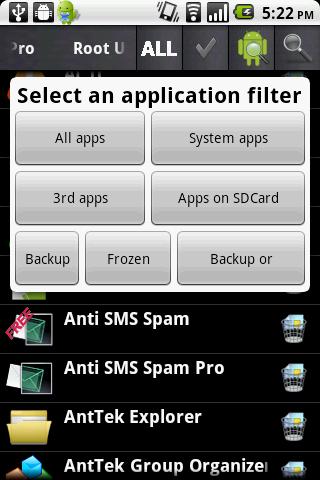
☆ Filter by third-party applications, system applications, applications on sdcard. backup applications or frozen applications
☆ Support large screen (ex. tablet) views
☆ Explore application data folder, code folder (ex. edit preferences, need AntTek File Explorer)
Trial on Free version :
☆ Three times to defrost or restore apps for Free version
IMPORTANT***IMPORTANT***
☆ Make sure you app is granted by SuperUser
☆ If you CANN'T freeze/defrost, try to enable USB Debugging (HOME/Settings/Application/Development/USB Debugging)
☆ If you CANN'T restore backup app, try to "find apps on SD card" then long-press the app and select "install as system app".
☆ This application uses SDCARD to store data
☆ PRO and FREE version are fully compatible
NOTES
- Some phones (ex. Desire) requires NAND unlocked (see more here http://alpharev.nl/).
- INTERNET/ ACCESS_NETWORK_STATE/ ACCESS_COARSE_LOCATION are required for displaying AdMob. The PRO version does not require these permissions.
# bloatware remover, bloat freezer, system app remover, system app uninstaller, system app freezer
Assistant request: rootuninstaller@gmail.com
Web site: http://rootuninstaller.com
Troubleshooting: http://rootuninstaller.com/qa/
Translation: http://www.getlocalization.com/rootuninstaller/
Facebook: https://www.facebook.com/pages/Root-Uninstaller/200912803368166

Download

Mirror
:Video:


Saturday, 1 February 2014

ROEHSOFT RAM Expander (SWAP)


Description

Please check your device for compatibility before you purchase this app with
'MemoryInfo & Swapfilecheck' to find it see my other apps.
This is the most powerful Release ever! Exclusive only here in Play Store!
Insufficient RAM, memory is too small? Use your SD card as a working memory expansion! A Memory Manager wich make's you life more easy as you think...
A great programmer once said to insufficient RAM -RAM only helps-. Convince yourself how right this man had.
Finally, more memory with a click! Memory from Android 1.6 up with root access and external SD card! More memory means that background tasks will never more automaticaly terminated, and many programs will work correctly in the first place!
On many devices, there are problems with games require a lot of memory, this fixes the problems RAMEXPANDER. And they can play latest games on devices that otherwise would not be able to start such APPs. No more out of memory! No more memory is full!
Languages: English and German
Note: please try before you buy with our app "https://play.google.com/store/apps/details?id=com.roehsoft.meminfo" whether their device ROEHSOFT RAM Expander is compatible, you!
- Free SD card memory as a RAM use (SWAP RAM / SWAP MEMORY)
- Swapfile RAM expansion up to 4.0 GB (file system limit)
- No limit on SWAP partition!
- The usual performance degradation when paged not occur with sd card from class-8
- Widget for PNP swap (swap on / off swap)
- Detailed Memory Information & Analysis
- Autorun
- Swappiness kernel parameter set
- Easy foolproof use
  (1 click optimization and automatic calculation)
- Supporting Tung all Android devices (root access and Kernelswap support)
Note: please try before you buy with our app "https://play.google.com/store/apps/details?id=com.roehsoft.meminfo" whether their device ROEHSOFT RAM Expander is compatible, you!
Should it come to problems please contact me before they write such queries to review forum!
not enough memory? equal to no more! More games to play and run more applications simultaneously! All you have to only increase your memory. And up to 4 GB! Larger memory, instead of using task killer or memory optimizer.
ROEHSOFT Ram Expander is more effective than any other tool of its kind Why? The First find out!
ROEHSOFT RAM expander support via a widget at lightning speed and off of extended memory.
This way you can remove the SD card despite swapfile or deploy via USB.
Also, you can important, elementary the swap kernel parameters even control the effectiveness of extended memory increase.
To gain root access you Linkk this helps any further http://shortfuse.org/.
Just affordable entry level phones often have little Ram, help either here or Task Killer programs continue but one uses a swapfile, which is enough memory available. ROEHSOFT Expander turns your device more easily. Many applications, you can start at the same time and do not have to worry about your Ram.
Extends every Android device up to 4 GB of memory in which it creates a swap file on the SDCARD.
Maximum size of the swap file is architecture requires 4GB!
By setting the swappiness value, you can control the behavior of the kernel, the higher the value the more is outsourced.
Please note! For any damage that may result from the use of this software are not responsible!

Download

Mirror
:Video:


Chainfire3D Pro


Description

Take control over your GPU!
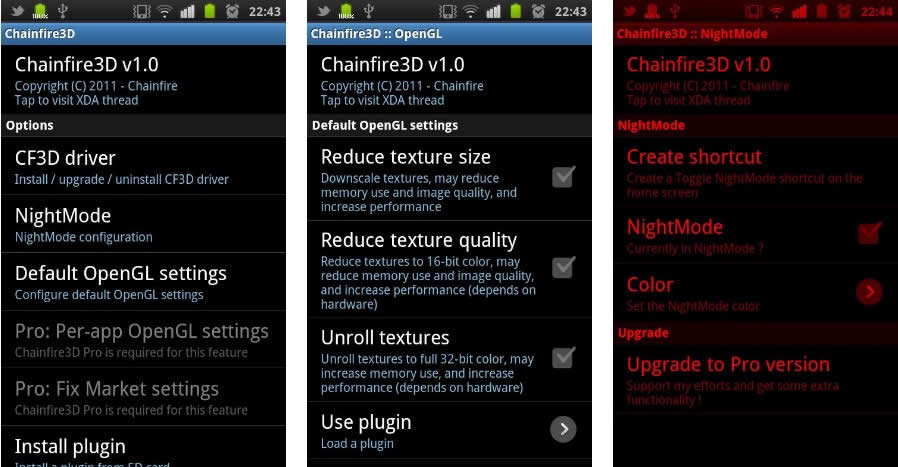
Chainfire3D is an intermediary OpenGL driver. What does that mean? It means that Chainfire3D sits between your apps and the graphics drivers, and can intercept and/or change commands between the two. It has some built-in functions, and can be further extended with plugins to provide extra functionality.
!! For Froyo and Gingerbread ONLY. NOT COMPATIBLE with Honeycomb/Ice Cream Sandwich/Jelly Bean !!
!! Chainfire3D is for 1ghz+ devices only !!
!! ROOT is required for this program, as well as a writable /system partition. S-OFF is also required on HTC devices !!
Features include reducing texture size and quality to reduce memory use and potentially increase game performance, as well as increasing memory use potentially increase performance.
If you also install the (experimental) EGL driver, AND your GPU supports it, AND you have the Pro version, you can enable 4xMSAA or 16xMSAA on a per-app bases. This can drastically improve image quality!
Be sure to check the thread on XDA for available plugins !
( http://forum.xda-developers.com/showthread.php?t=1087427 )
Chainfire3D has been tested on:
- HTC HD2
- Samsung Galaxy S
- Samsung Galaxy Tab 7"
- Samsung Galaxy S II
- Samsung Galaxy Note
- Samsung Epic 4G
- Motorola Atrix 4G
- Motorola Droid 2
- LG Optimus 2X
- Google Nexus S
Many users are running Chainfire3D on devices not listed here - it's likely to work on all modern devices. So far nobody has reported a failed install, so that's good. Doesn't mean problems can't happen.
!! There is some risk involved installing the driver. Your device may not boot. If you have CWM, it would be prudent to create a backup before installing !!

 Download
Download

 Mirror
 Mirror
:Video: